
If you have ever gotten a text that says “Fraud alert: confirm this charge now” or an email that claims your account is locked, you are not alone. Scammers copy bank logos, use urgent language, and try to create just enough panic that you click before you think.
Here is the simple rule I live by: your bank may contact you, but it will not ask you to log in through an unsolicited link or share a one-time code with anyone. Codes are for you to enter into the bank’s app or website, not to read to a person. Use the checklist below to slow things down and verify safely.
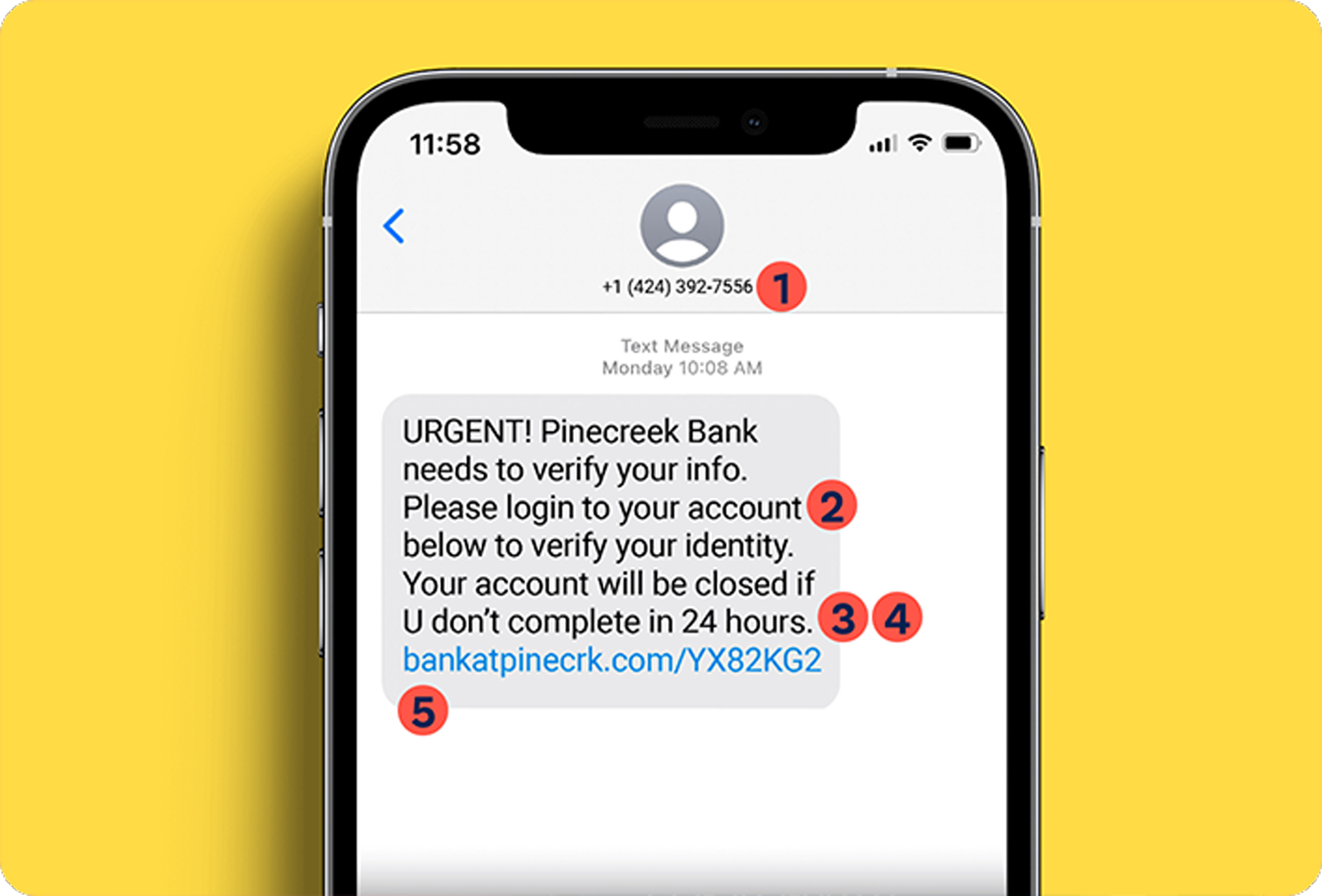
Quick checklist: scam red flags
If you spot any of these, treat the message as suspicious until you verify it through a trusted channel.
1) Urgency or fear tactics
- “Your account will be closed today.”
- “Unusual login detected, act now.”
- “Final notice” or “last chance” language.
- Pressure to respond in minutes, not hours.
2) The sender is off, even if the name looks right
- Email address does not match your bank’s real domain (example: [email protected]).
- Text comes from a long phone number or a short code you have never seen.
- Reply-to address is different than the from address.
- The greeting is generic like “Dear Customer” when your bank normally uses your name.
Note: Phone numbers and sender IDs can be spoofed. Even if a text or call looks like it is from your bank, you still need to verify using your app or the number on your card.
3) Links that look slightly wrong
- Misspellings, extra dashes, or extra words in the web address.
- Shortened links (bit.ly, tinyurl) for “bank alerts.”
- Link text says one thing, but the actual URL (hover on desktop, press-and-hold preview on mobile) shows something else.
- It sends you to a login page that looks real but the address bar is unfamiliar.
If a message includes a link, the safest move is simple: do not log in from the link. Close it and open your bank’s official app or type the website yourself.
4) Requests your bank should not make
- Your password, PIN, or full Social Security number by email or text.
- A one-time verification code (2FA) to read aloud, forward, or “confirm your identity” to a person.
- Requests to install third-party remote access apps (like AnyDesk or TeamViewer), especially from an unsolicited message or call.
- Gift cards, wire transfers, crypto, or “safe account” transfers.
5) Odd mistakes and “almost right” details
- Typos, awkward grammar, or inconsistent fonts.
- Wrong last four digits, wrong bank product name, or a charge description that feels generic.
- Attachments you were not expecting. Formats like .zip, .html, and .exe are common ways malware is delivered.
The safest way to verify a bank alert
When a message might be real, your goal is to confirm it without using anything inside the message (no links, no callback numbers, no attachments).
Step 1: Pause and use a trusted channel
- Use your bank’s official mobile app (the one you already have installed), or type the bank’s website yourself in a browser.
- Check your account alerts, messages, and recent transactions.
Step 2: Call the number on the back of your card
- Use the phone number printed on your debit or credit card, or from your monthly statement.
- If you found a number through search, double-check it inside your bank’s official website or app first.
Step 3: Ask for confirmation and next steps
Tell the representative you received a message about fraud or account access and want to know whether the bank sent it and whether you need to take any action. If it was real, they can usually see alert history or notes tied to your account.
Step 4: If you are unsure, treat it as a scam
It is always okay to hang up and call back using the number on your card. Real bank staff understand this and will not guilt you for protecting yourself.
Phone call scams: one extra rule
Scammers can spoof caller ID, so the call can look like it is coming from your bank even when it is not.
- If you get a surprise call about fraud, do not stay on the line to “verify” anything.
- Hang up and call back using the number on the back of your card or inside your official app.
Common bank scam scripts
“We detected fraud. Verify with this code.”
This is a big one. Scammers may trigger a real one-time code by attempting a login or password reset, then ask you to read them that code. If you share it, you are basically handing them the key. A real bank flow has you enter the code in the app or website, not speak it to someone.
“Your account is on hold. Click to unlock.”
These links often go to a lookalike login page. The moment you type your username and password, they have it.
“Zelle or wire transfer to a safe account.”
Many scams revolve around moving your money quickly. If someone is pushing you to transfer funds to “protect” them, stop and verify using your app or the number on your card.
“Download this app so we can help.”
Remote access tools let scammers see your screen and sometimes control your device. Be especially wary of third-party remote access apps suggested during an unsolicited message or call.
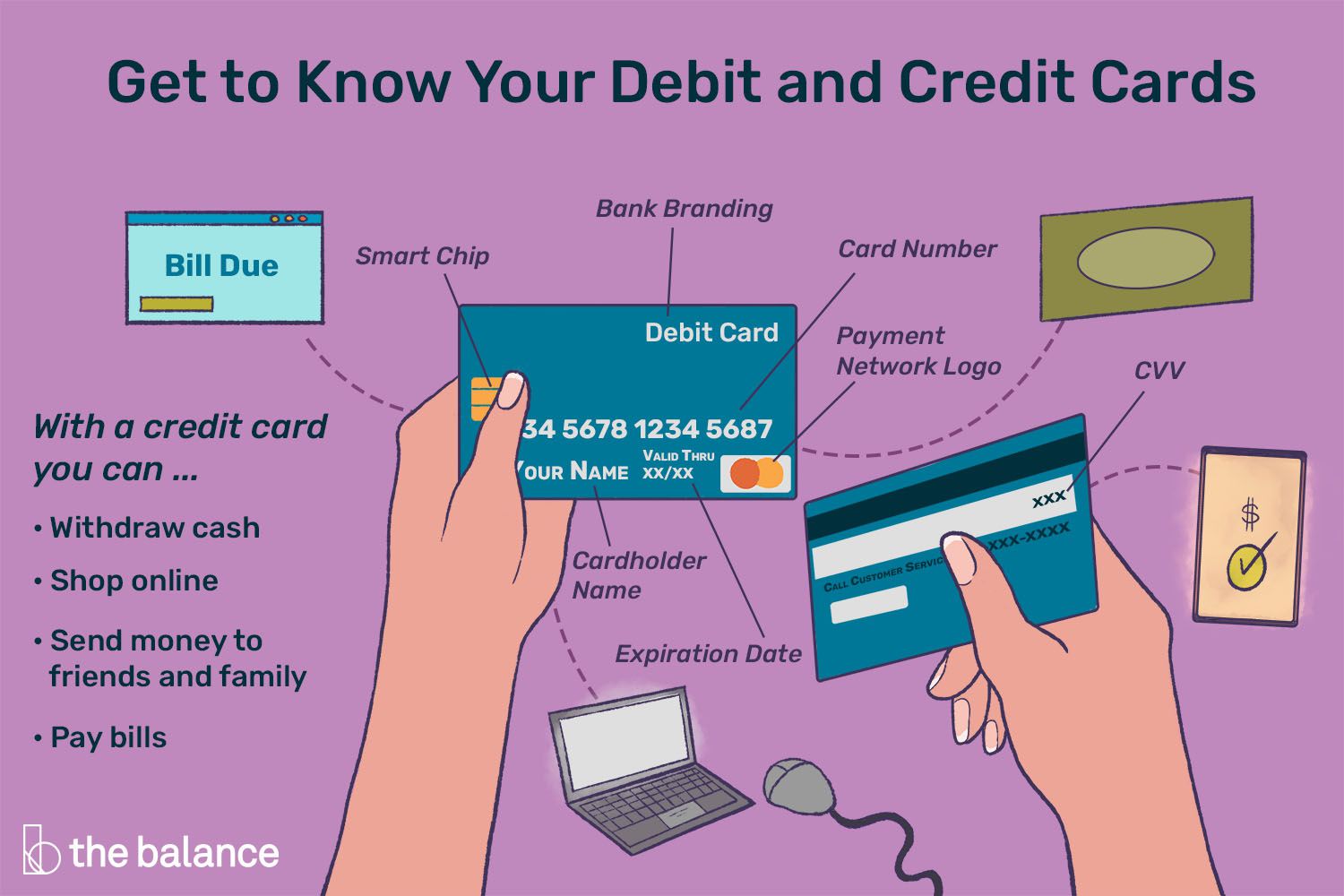
If you already clicked, replied, or shared info
First, breathe. The goal now is to limit the damage and lock things down quickly. The steps below are general safety guidance, not legal advice.
If you clicked a link but did not enter information
- Close the page.
- Do not download anything that page offered.
- Run your device’s security scan (built-in antivirus tools or reputable security software).
- Log into your bank through the official app or typed website and review recent activity.
If you entered your login, PIN, or card details
- Change your bank password immediately using the official app or website.
- Turn on two-factor authentication (app-based authenticator is stronger than SMS when available).
- Call your bank using the number on the back of your card to report it and ask about next steps, including monitoring or replacing cards.
- Check for new payees, external transfer links, or changed contact info (email, phone number, mailing address).
- Secure your email account too (change the password, turn on 2FA), since email takeover often leads to bank takeover.
If you shared a one-time code
- Assume someone tried to access your account in real time.
- Call your bank right away and ask them to review recent logins and secure the account.
- Change your password and sign out of other sessions if your bank offers that option.
If your Social Security number was shared
- Consider placing a fraud alert or credit freeze with your credit bureaus (process varies by country).
- Watch for new accounts opened in your name and unexpected credit inquiries.
If money was sent
- Contact your bank immediately. The sooner you report, the better your odds of stopping certain transactions.
- Keep expectations realistic: some transfers (wires, Zelle, crypto) are often difficult or impossible to reverse once they are completed.
- Document what happened: screenshots, phone numbers, emails, times, and amounts.
Report it (optional, but helpful)
- Forward suspicious texts to your bank’s fraud reporting channel if they provide one.
- In the US, you can forward scam texts to 7726 (SPAM) to help your mobile carrier investigate.
- In the US, you can also report fraud attempts to the FTC (ReportFraud.ftc.gov) and internet-enabled crime to IC3 (ic3.gov). If you are outside the US, look for your country’s consumer protection or cybercrime reporting site.
Do this now to reduce your risk later
Scams are stressful. A few small habits make you much harder to target.
- Set up real-time transaction alerts in your bank app for purchases, transfers, and login attempts.
- Use a password manager and unique passwords for financial accounts.
- Lock down your phone number with your mobile carrier (ask about port-out or SIM swap protection).
- Keep your devices updated (OS and browser updates close common security holes).
- Keep your contact info updated with your bank so you get legitimate alerts.
- Never trust a message just because it knows your name. Data leaks make personalization easy.
If you want a simple mantra to remember: Do not click. Do not reply. Verify in the app or call the number on your card.
Mini script you can copy
If you receive a suspicious email or text and want to respond safely, do not respond to that message. Instead, call your bank using the number on your card and say:
“Hi, I received a message claiming to be from [Bank Name] about possible fraud or account access. I did not click anything. Can you confirm whether you sent it and if there are any actions needed on my account?”
That one sentence keeps you calm, keeps you in control, and gets you to the truth fast.